




🔄 “Sorry, Something Went Wrong” Infinite Loop: How to Detect a Corrupted Session Cookie
If you open Facebook and get stuck in an endless “Sorry, Something Went Wrong” loop where refreshing the page, reopening the app, or even restarting the device changes absolutely nothing, you are most likely facing a corrupted session cookie problem 🍪😵💫. This is one of those issues that feels personal, persistent, and oddly immune to basic troubleshooting, because unlike network failures or app crashes, the problem lives quietly inside your authenticated session state rather than on the surface.
What makes this loop especially frustrating is that Facebook does not log you out. You appear to be signed in, parts of the interface may load, and yet every meaningful action redirects you back to the same error. From a diagnostic standpoint, this behavior is almost never random. It is a strong, recognizable signal that your session cookie exists, but its internal state is no longer valid.
🔍 Definition: What Is a Corrupted Session Cookie?
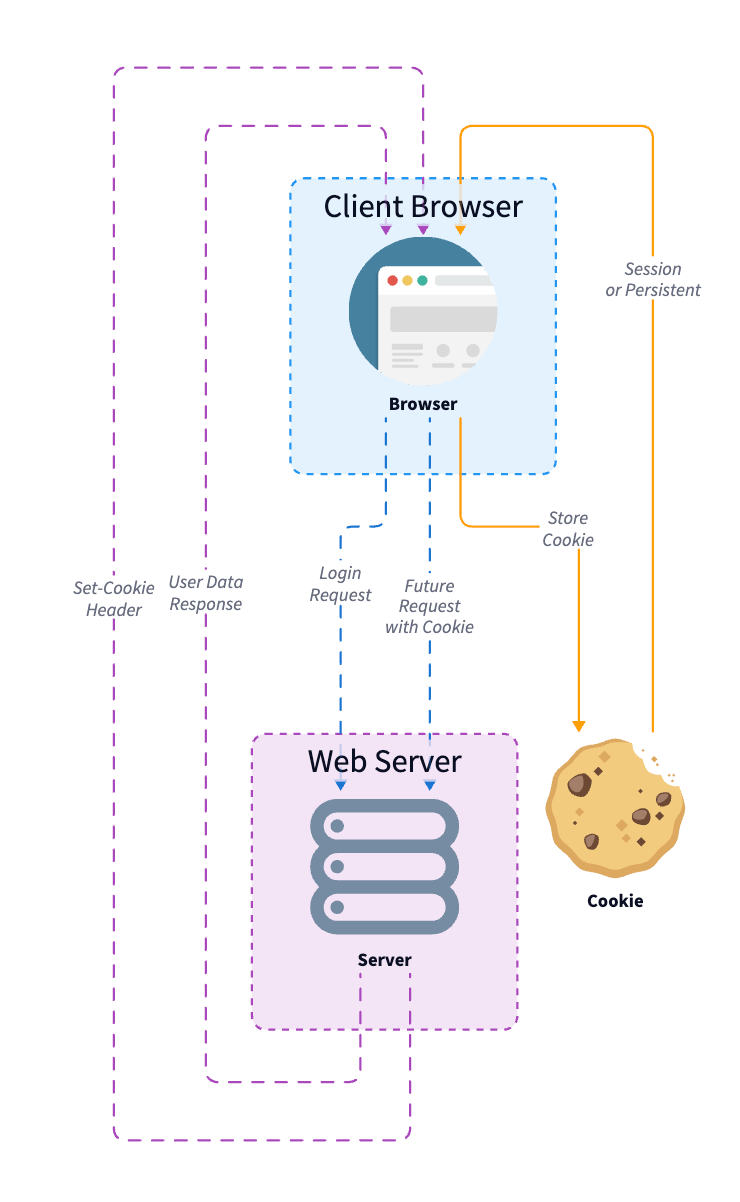
A session cookie is a small but critical piece of data stored on your device or browser that tells Facebook who you are, that you have already authenticated successfully, and what permissions your current session has. Under normal conditions, this cookie is refreshed, validated, and rotated seamlessly in the background. You never notice it, and you are not meant to.
A corrupted session cookie occurs when this data becomes internally inconsistent. The cookie might still be present and technically readable, but its cryptographic signature, expiration metadata, or session binding no longer matches what Facebook’s backend expects. As a result, Facebook neither fully accepts nor fully rejects the session. Instead of logging you out cleanly, it traps you in an authentication limbo where every request fails validation and redirects back to the same generic error message 🔁.
📌 Why This Issue Is So Important (And Why It Creates an Infinite Loop)
Facebook’s authentication system is designed to be extremely strict for security reasons. When a session cookie is invalid, Facebook prefers to fail safely rather than risk session hijacking or privilege escalation. However, in certain edge cases, especially when multiple authentication layers are involved, this safety mechanism backfires into an infinite loop.
This loop happens because the system believes you are logged in based on the presence of a cookie, but simultaneously refuses to honor that cookie when protected resources are requested. The frontend keeps retrying, the backend keeps rejecting, and neither side triggers a full logout flow. From the user’s perspective, it feels like pressing an elevator button that lights up but never moves 🚪⬆️.
🧠 How Session Cookies Become Corrupted in the First Place
Session cookie corruption rarely comes from a single dramatic event. Much more often, it is the result of subtle inconsistencies accumulating over time. Logging in from multiple devices simultaneously, switching rapidly between Wi-Fi and mobile data, using VPNs intermittently, restoring apps from backups, or even partial app updates can all create mismatches between client-side session data and server-side expectations.
Browser-based Facebook sessions are particularly sensitive to this when third-party cookies, local storage, or enhanced tracking protection features interfere with how session tokens are refreshed. On mobile apps, corruption can occur when the app process is killed mid-refresh or when the operating system restores cached session data that Facebook no longer recognizes as valid 😶🌫️.
🛠️ How to Detect a Corrupted Session Cookie (Without Guessing)
The key to detecting a corrupted session cookie is pattern recognition rather than trial and error. One of the strongest indicators is consistency across retries. If the error appears instantly every time, regardless of network quality, device restarts, or waiting periods, the issue is not transient.
Another strong signal is selective breakage. You may find that Facebook opens to a shell interface, notifications partially load, or settings pages briefly appear, but any action that requires revalidation sends you straight back to the error. This selective failure is classic session corruption behavior.
A practical test is logging in from a completely different environment. If Facebook works normally in an incognito browser window, on another device, or after logging in with the same account elsewhere, the account itself is not restricted. The problem is localized to a specific session container, confirming cookie corruption rather than account enforcement 🧪.
📊 A Real-World Diagnostic Example
In one real case, a user reported being stuck in the “Sorry, Something Went Wrong” loop for days on both desktop and mobile, yet Facebook worked instantly when accessed from a friend’s laptop. Clearing cache alone did nothing. The moment all Facebook-related cookies and local storage entries were removed manually, the login flow reset cleanly and the loop disappeared permanently. The user described the fix as “Facebook suddenly remembered who I was again,” which is surprisingly accurate for a broken session state 😊.
📈 A Metaphor That Makes the Problem Click
Imagine your session cookie as a wristband at a concert. Security sees the wristband and assumes you are allowed in, but when they scan it, the code no longer matches the system. Instead of escorting you out to get a new one, they keep sending you back to the entrance in a loop. Removing the wristband entirely forces the system to issue a fresh one 🎟️🔄.


❓ Frequently Asked Questions (FAQ)
- Why doesn’t Facebook just log me out?
Because the session appears present but fails validation in a non-terminal way. - Is this a Facebook server outage?
No, outages affect many users simultaneously, not a single session. - Does clearing cache always fix it?
Not always, cookies and local storage must also be removed. - Can browser extensions cause this?
Yes, especially privacy and script-blocking extensions. - Does this happen on mobile apps too?
Yes, app-level session storage can also become corrupted. - Is my account compromised?
No, this is a session integrity issue, not a security breach. - Why does incognito mode work?
Because it starts with a clean session state. - Can VPN usage trigger this?
Yes, frequent IP changes can confuse session binding. - Does waiting fix it automatically?
Rarely, because the corrupted cookie remains stored. - Is logging out possible during the loop?
Often no, because logout itself requires a valid session.
🤔 People Also Ask
Why does Facebook keep refreshing with an error?
Because the frontend retries using an invalid session token.
Is this related to two-factor authentication?
Indirectly, especially if a session refresh is interrupted.
Can syncing devices cause this?
Yes, concurrent logins can desynchronize sessions.
Should I reset my password?
Only if you suspect unauthorized access, not for cookie corruption.
Is deleting cookies safe?
Yes, it only removes local session data.
✅ Final Thoughts
An infinite “Sorry, Something Went Wrong” loop on Facebook is one of the clearest indicators of a corrupted session cookie, even though the platform rarely explains it explicitly. Once you understand that the issue is not your internet, your device, or your account, but a broken authentication state trapped in memory, the solution becomes clean and decisive. Clearing the session forces Facebook to start fresh, and when the loop finally breaks, it feels less like luck and more like restoring order to a system that simply lost track of itself 😌🔐.
You should also read these…
- hogwar.com – tweets wont load browser extensions cookies and in
- olddry.com – tiktok business account not opening
- spyfrogs.com – the hidden risks of x spaces could you be getting
- tugmen.com – cheap wireless chargers that actually work
- toojet.com – fortnite server offline issues and fixes
- hogwar.com – turning failures into learning opportunities
- surgeblog.com – decoding cognitive biases specific to remote work
- axtly.com – practical solutions you can apply at home with pe
- hogwar.com – tiktok for you feed not loading
- olddry.com – can ai actually be creative