


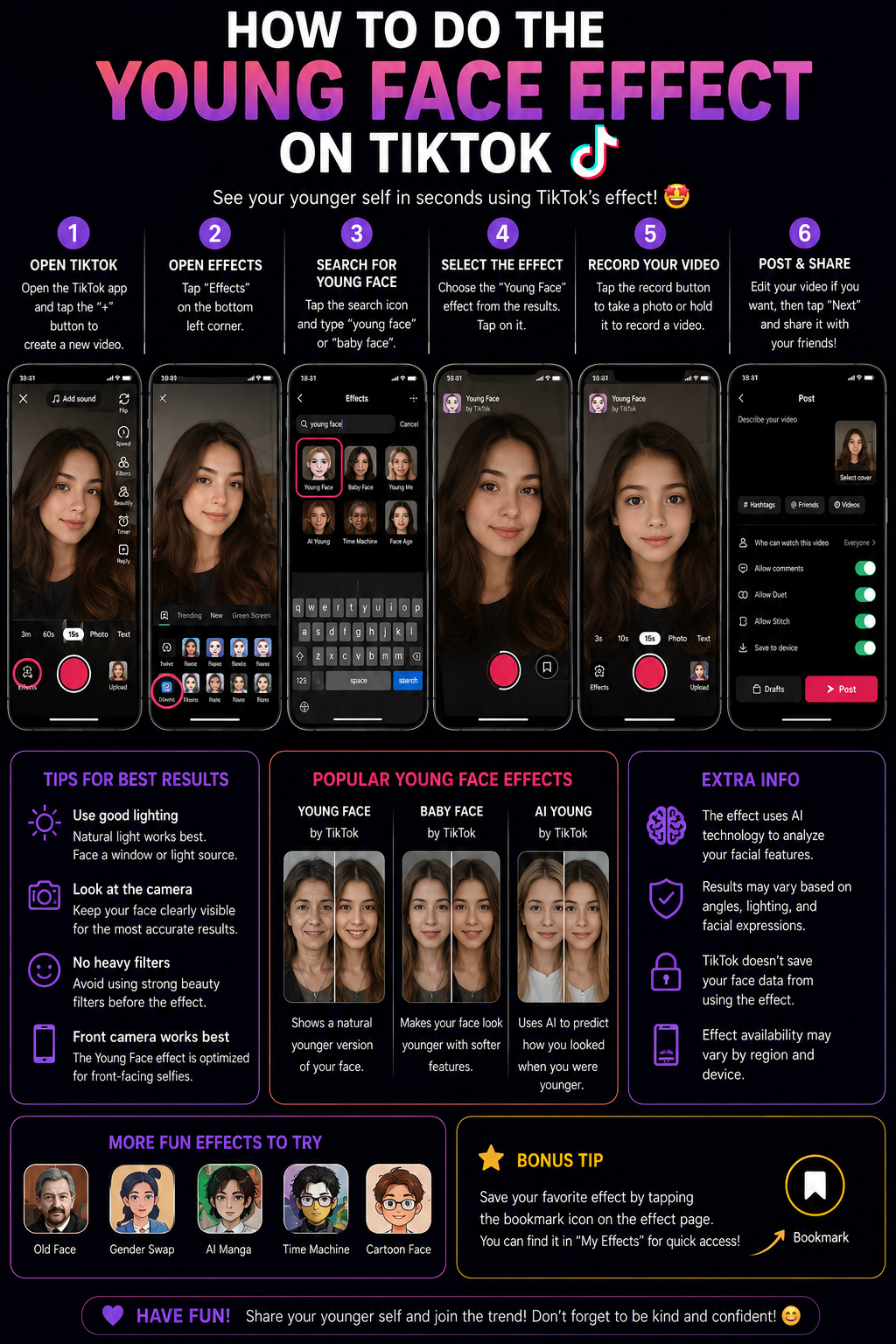

The Young Face effect on TikTok is a facial transformation that creates a more youthful appearance by softening visible lines, brightening the complexion, reducing under eye shadows, subtly changing facial proportions, or applying a playful baby face style. Depending on the specific effect you choose, the result may look like a lightly refreshed version of your face, a dramatic age reversal, or an exaggerated childlike transformation designed primarily for comedy and reaction videos.
Although users often refer to it as “the Young Face filter,” TikTok may not provide one permanent effect under that exact name. TikTok’s effect library changes regularly, creators can publish effects with different titles, and some effects may be available only in certain regions or application versions. The most reliable approach is therefore to search using several related phrases, save the effect to Favorites as soon as you find it, or open the exact effect from a TikTok video that already uses it. 😊
TikTok officially explains that effects can be added before or after recording, although some are available only during one stage of production. The platform also allows effects to be saved in Favorites for easier access later. You can review the official instructions in TikTok’s Effects and Filters guide.
Definitions 🧠
Young Face effect: A camera or editing effect designed to make a face appear younger through skin smoothing, brighter tones, reduced shadows, softer facial contours, larger looking eyes, fuller cheeks, or other age reducing visual adjustments.
De-aging effect: A broader term for technology that attempts to reverse visible signs of aging. Some de-aging effects are subtle and realistic, while others create a dramatic transformation intended for entertainment.
Baby Face effect: A more exaggerated version of the Young Face effect that may enlarge the eyes, round the cheeks, shorten the jawline, smooth the skin heavily, or modify other facial proportions.
TikTok effect: An interactive visual tool that can respond to the face, body, voice, movement, or environment. Effects can include facial transformations, virtual makeup, animation, background replacement, visual distortion, and augmented reality elements.
TikTok filter: A visual preset that changes the color, warmth, contrast, brightness, or overall atmosphere of a video. Filters generally affect the complete frame, while facial effects can track and modify particular facial features.
AI Create: A TikTok editing feature that can generate images or videos using prompts and uploaded content where the feature is available. It can provide an alternative when a suitable live Young Face effect cannot be found.
Why the Young Face Effect Is Popular 🎯
The Young Face effect attracts attention because it creates an immediate and recognizable transformation. Viewers can compare the original appearance with the modified version without needing a long explanation, making it useful for reaction videos, age comparison trends, family content, comedic sketches, future versus past concepts, and before and after edits.
The effect can also create a sense of nostalgia. Seeing a digitally younger version of yourself may remind you of childhood photographs, school years, family memories, or earlier stages of life. In humorous videos, the transformation can support captions such as “me pretending deadlines do not exist,” “when someone says I still look sixteen,” or “how my family still sees me.” The visual change becomes both the hook and the punchline. 😄
Metaphorically, a Young Face effect works like a digital time machine built into the camera. It does not genuinely reverse time, but it creates a playful window into an imagined younger version of the person on screen. ⏳
How to Apply the Young Face Effect 🛠️
Method 1: Search for a Young Face Effect in TikTok 🔎
This is the easiest method when you want to record the transformation directly in TikTok.
1. Open the TikTok application.
2. Tap the Add Post + button at the bottom of the screen.
3. Tap Effects at the bottom of the camera screen.
4. Open the effect search option where it is available.
5. Try several relevant search phrases rather than relying on only one:
- Young Face
- Younger
- Young
- De Age
- Age Reverse
- Baby Face
- Youth
- Face Age
- Age Transformation
- Smooth Face
6. Tap an effect to preview it. TikTok should apply the selected effect automatically to the camera image.
7. Test several facial expressions, including smiling, looking sideways, raising your eyebrows, and speaking, so you can determine whether the effect tracks your face consistently.
8. Tap the Favorites button at the top of the effects panel before recording.
9. Return to the camera and record your video.
10. Review the entire clip before posting, paying particular attention to the hairline, jaw, eyes, mouth, glasses, and moments when you turn your head.
Saving the effect is important because TikTok search results can change, similarly named effects can appear later, and the version you liked may be difficult to locate again.
Method 2: Open the Exact Young Face Effect from Another Video 📲
This method is normally more reliable than searching when you have already found a TikTok video with the precise result you want.
1. Open the TikTok video that uses the desired Young Face effect.
2. Look for the effect name displayed near the creator’s username, caption, or lower area of the video.
3. Tap the effect name to open its dedicated page.
4. Review other videos made with the same effect to confirm that it produces the intended result.
5. Tap Use this effect.
6. Add the effect to Favorites before recording.
7. Create a short test clip and compare it with the original trend.
If the video does not display an effect name, the creator may have produced the younger appearance with a beauty adjustment, AI editing tool, external application, or manually edited before and after sequence rather than a reusable TikTok effect.
Method 3: Use a Baby Face Effect for a Stronger Transformation 👶
If the regular Young Face results look too subtle, searching for Baby Face may produce a more obvious transformation. These effects often change facial structure rather than simply smoothing the skin.
1. Open TikTok’s Effects panel.
2. Search for Baby Face, Child Face, Little Me, or Younger Me.
3. Preview multiple variations because some effects create realistic results while others intentionally look exaggerated.
4. Choose the version that fits your content. A subtle effect may be better for a comparison video, while an exaggerated effect may work better for comedy.
5. Save it to Favorites and record in bright, even lighting.
Remember that a Baby Face effect is not always a realistic age reversal. It may be designed as a cartoon style transformation with intentionally enlarged features.
Method 4: Create a Before and After Young Face Transition 🔄
A before and after structure makes the age transformation easier to understand and often creates a stronger opening hook than displaying the effect throughout the complete video.
1. Choose an audio track with a clear beat, lyric, or sound cue.
2. Place the phone on a tripod or stable surface.
3. Record the opening clip without the Young Face effect.
4. End the first clip with a movement that can hide the cut, such as covering the camera, turning your head, snapping your fingers, blinking, or moving closer to the lens.
5. Activate the Young Face effect.
6. Return to the same position and recreate the final part of the transition movement.
7. Open TikTok’s editing timeline and place the two clips together.
8. Trim the clips so the visual change happens exactly on the musical beat or transition movement.
9. Add short labels such as Now and Younger Version if the change is not immediately obvious.
Consistency is essential. The camera height, distance, head angle, lighting, and body position should remain nearly identical between the two clips. The transition works like a stage illusion: the effect creates the transformation, but careful alignment makes the transformation believable.
Method 5: Use TikTok’s Beauty and Filter Tools for a Subtle Younger Look ✨
You may not need a dramatic face transformation if your goal is simply to create a fresher or softer appearance. TikTok filters and available beauty adjustments can sometimes produce a more natural result.
1. Tap Add Post +.
2. Open Filters from the side panel.
3. Compare portrait and atmosphere filters available in your application.
4. Use the intensity slider to reduce the strength of the filter.
5. Check for available retouching or beauty controls in your camera interface.
6. Apply only moderate smoothing, brightness, or under eye correction.
7. Record a test clip and compare it with the unfiltered camera before continuing.
A subtle adjustment often looks more natural than an aggressive effect because it preserves facial texture and proportions. Good lighting combined with a low intensity filter can produce a youthful appearance without making the face look digitally reconstructed.
Method 6: Use AI Create When It Is Available 🤖
TikTok’s AI Create tool allows users in supported regions to generate an image or video using prompts together with uploaded content. It can provide another route when you cannot find a live Young Face effect that matches your goal.
1. Tap Add Post +.
2. Record or upload a clear photograph or short video.
3. Continue to the editing screen.
4. Tap AI Create if the option appears.
5. Select an available creation option or enter a prompt where supported.
6. Describe the result carefully, requesting a younger but recognizable version with natural proportions and realistic lighting.
7. Generate multiple versions and compare facial identity, hair, teeth, eyes, accessories, and background details.
8. Save the strongest result and clearly label realistic AI altered content when appropriate.
A practical prompt could be: “Create a younger adult version of the person while preserving recognizable facial identity, natural skin texture, hairstyle, clothing, lighting, background, and realistic facial proportions.”
AI Create is not available in every region or account, so the absence of the option does not necessarily indicate a problem with your application.
Which Young Face Method Should You Choose? 📊
| Creative Goal | Recommended Method | Main Advantage | Main Limitation |
|---|---|---|---|
| Instant live younger appearance | Search TikTok Effects | Fast and easy to preview | Effect names and availability can change |
| Copy a specific viral result | Open the effect from the original video | Provides the exact effect version | The video may not use a reusable effect |
| Create a playful childlike face | Baby Face effect | Produces an obvious transformation | May look exaggerated rather than realistic |
| Show an age reversal reveal | Before and after transition | Creates a strong story and visual payoff | Requires careful alignment and trimming |
| Create a natural youthful appearance | Low intensity filter and beauty adjustments | Preserves facial realism | Does not produce a dramatic age transformation |
| Generate a detailed younger portrait | AI Create where available | Can reinterpret the entire image | Processing can alter identity or background details |
Young Face Workflow Diagram 🧩
Choose the result you want
          |
          +--> Live age reduction
          |        |
          |        +--> Effects -> Search "Young Face" -> Preview -> Favorite
          |
          +--> Exact viral effect
          |        |
          |        +--> Open source video -> Tap effect -> Use this effect
          |
          +--> Dramatic childlike transformation
          |        |
          |        +--> Search "Baby Face" -> Test several versions
          |
          +--> Before and after reveal
          |        |
          |        +--> Record original -> Hide cut -> Activate effect
          |
          +--> AI generated younger version
                   |
                   +--> Upload -> AI Create -> Generate -> Review -> Post
How to Make the Young Face Effect Look Better ✨
Use Soft Front Lighting
Place a window, ring light, or soft light in front of your face. Strong overhead lighting creates shadows beneath the eyes and nose, while very low lighting can cause face tracking to flicker or apply smoothing unevenly.
Keep the Camera at Eye Level
A camera positioned too low can exaggerate the chin and jaw, while a camera positioned too high can create an unnaturally small lower face. Eye level framing gives the effect a clearer facial structure to follow.
Begin with a Front Facing Position
Many facial transformations work best when both eyes, the nose, mouth, and jawline are clearly visible. After confirming that the effect tracks correctly, test moderate side movements.
Avoid Covering the Face
Large glasses, masks, hands, heavy hair, reflective accessories, and deep shadows may interrupt tracking. Use a clear composition during the initial recording.
Do Not Stack Too Many Effects
A Young Face effect combined with heavy beauty smoothing, reshaping, and a strong color filter can erase skin texture and change the face beyond recognition. Choose one primary facial effect and use only a subtle supporting filter.
Use a Simple Background
A plain or uncluttered background helps the viewer focus on the facial transformation and may reduce visual errors around hair and facial edges.
Record Short Clips
Short videos are easier to review and usually maintain more consistent tracking. Long recordings introduce more head turns, expressions, lighting changes, and opportunities for the effect to drift.
Practical Example: Young Face Reveal Video 🎬
Imagine that you want to create a six second “meeting my younger self” TikTok. You place your phone on a tripod and select an audio track with a clear beat at three seconds. You record yourself looking at the camera without an effect, raise your hand toward the lens, and completely cover the camera on the beat. You then activate the Young Face effect, return to the same standing position, begin with your hand covering the lens, and pull it away while making a surprised expression.
In TikTok’s editor, you trim the first clip immediately after the camera becomes fully covered and trim the second clip immediately before your hand begins to move away. You align the cut with the musical beat, add the caption “Meeting my younger version”, and keep the final clip short enough for viewers to watch the transformation more than once.
A Short Anecdote ☕
I have seen creators spend several minutes searching for an effect under the exact phrase “Young Face,” only to conclude that TikTok had removed it. When they opened a video containing the transformation and tapped the displayed effect name, they discovered that the creator had published it under a completely different title. After saving it to Favorites, they could reuse it instantly. The experience demonstrates why effect names are less important than finding the original effect page.
Personal Workflow 🙂
For a casual reaction video, I would first find a current TikTok using the effect I want and open the effect directly from that post rather than depending entirely on search. I would save it to Favorites, record a short test in soft front lighting, and check whether the eyes, mouth, hairline, and jaw remain stable while speaking. For a polished transformation, I would record separate before and after clips from a fixed camera position and align the reveal with a musical beat. If the goal were a realistic younger portrait rather than a live video, I would consider AI Create where available, generate several versions, and choose the one that preserves recognizable identity most accurately.
Responsible Use and Self Image 💛
The Young Face effect is intended primarily for entertainment and should not be treated as an objective measure of attractiveness, age, health, or personal value. Digital smoothing and facial reshaping can create unrealistic expectations because the effect may remove normal skin texture, alter proportions, and present an appearance that cannot be reproduced through everyday lighting or makeup.
When using another person’s photograph, especially a child or private individual, obtain permission before uploading it to an AI editing tool. Review the privacy practices of any external service that processes facial images. When a generated result is realistic enough to mislead viewers, label it clearly as an AI edit, face effect, or digital transformation.
Frequently Asked Questions 🤓
1. Why can’t I find an effect called Young Face?
The effect may have another title, may not be available in your region, or may have been removed. Search related phrases and open the effect directly from a current video whenever possible.
2. Is Young Face the same as Baby Face?
Not always. Young Face effects may make subtle age reducing changes, while Baby Face effects often alter facial proportions more dramatically.
3. Can I apply the effect after recording?
Some TikTok effects work after recording, while others are available only before recording. Test the effect before filming when you want guaranteed live face tracking.
4. How do I save the effect?
Open the Effects panel, select the effect, and tap the Favorites button at the top of the panel.
5. Why does the effect disappear when I turn sideways?
The effect may lose track of facial landmarks at strong angles. Use brighter lighting and keep both eyes visible during the transformation.
6. Why does my face look too smooth?
The effect may include strong skin smoothing, or another beauty adjustment may also be active. Disable additional retouching or choose a more natural effect.
7. Can I use the effect on an uploaded photograph?
Some effects accept uploaded media, while others require the live camera. AI Create may provide an alternative where it is available.
8. Why does the effect look different on another person?
Facial structure, lighting, camera quality, expression, skin tone, and the exact effect version can influence the result.
9. Can I combine Young Face and Aging effects in one TikTok?
Yes. Record separate clips with each effect and combine them in the editor to create a young, current, and older age progression.
10. What is the fastest way to get the exact viral effect?
Open the original TikTok, tap the effect name, select Use this effect, and save it to Favorites.
People Also Asked 🔎
Does TikTok have a built in de-aging filter?
TikTok offers a changing collection of effects rather than guaranteeing one permanent de-aging tool. The available options depend on the current effect library and your account.
Can I make myself look younger without changing my face shape?
Yes. Use soft lighting, a low intensity portrait filter, and minimal beauty adjustments rather than an effect that modifies facial proportions.
Why is the effect not visible in Favorites anymore?
The creator may have removed it, TikTok may have restricted it, or the effect may no longer be available in your region.
Can AI Create produce a younger version of a video?
AI Create can generate images or videos from prompts and uploaded content where supported, but the available creation modes can differ between accounts and regions.
What content works best with a Young Face effect?
Before and after reactions, family resemblance comparisons, humorous age reversal videos, childhood photo recreations, and young to old progressions work particularly well.
Conclusion ✅
To do the Young Face effect on TikTok, open the creation camera, tap Effects, and search several terms such as Young Face, Younger, De Age, Age Reverse, or Baby Face. Preview multiple options, save the best effect to Favorites, and record in soft front lighting with your face clearly visible. When you want the exact version used in a viral video, open the effect directly from that TikTok instead of guessing its name. For a stronger transformation, combine the original and modified clips in a beat matched before and after transition, or use AI Create where it is available for a generated younger portrait or video. The most convincing results come from stable framing, moderate effect strength, clear lighting, short recordings, and careful review rather than excessive smoothing or facial reshaping. 👶✨